

This month we’ve released significant improvements to how file handling works on Sundog.
Firstly, we’re making it clearer which image formats we support. As of today, Sundog works with .jpeg, .ndpi, .ome.tiff, .png, .qptiff, .scn, .svs, and .tiff files. When we add new format support, we’ll announce it here and make it clear in the product and documentation that that’s the case.
NDPI has been added to this list as of the past few weeks. If you’re looking to collaborate on your NDPI-based images, why not get in touch with us about how you can put Sundog to use?
We’ve also improved our upload display:
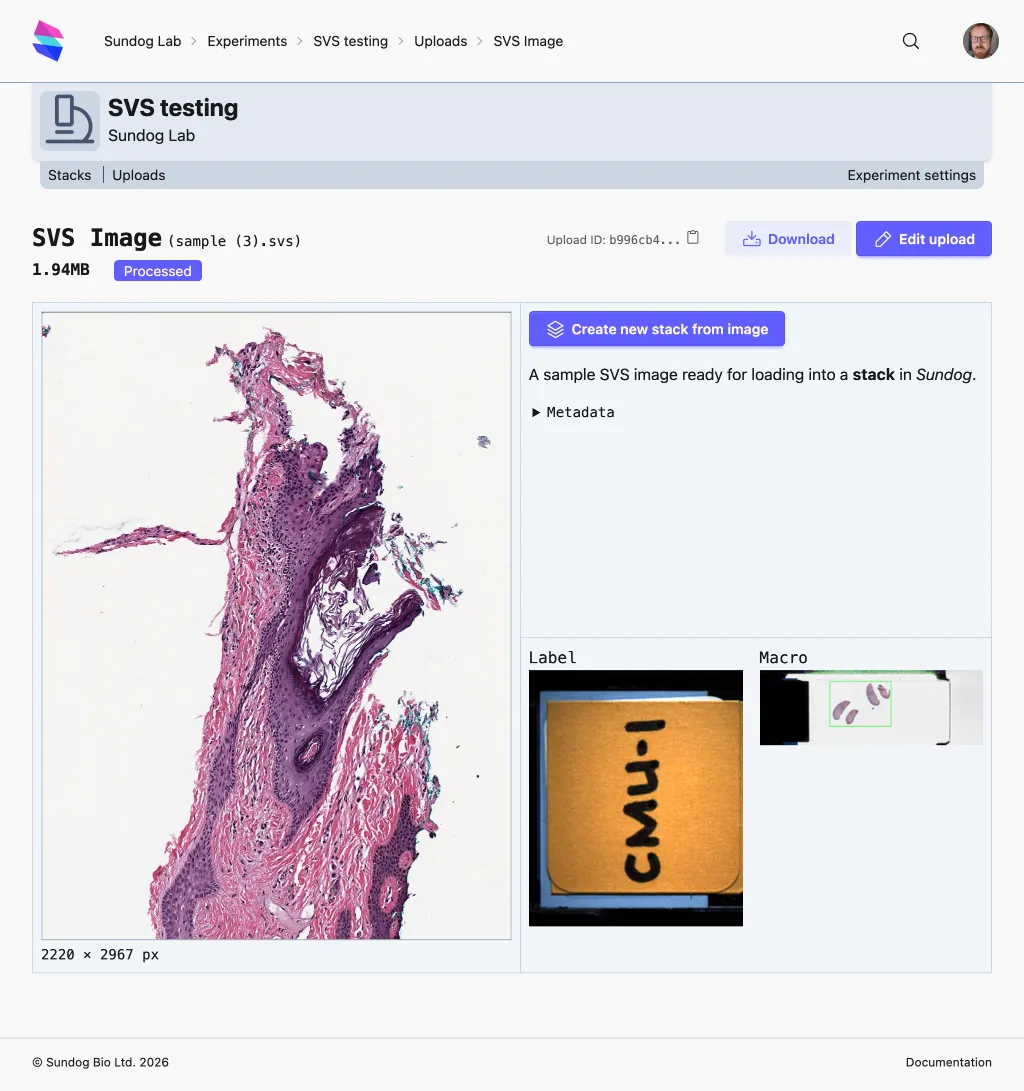
There’s now a live preview of the image (that you can slip/slide, just like in the StackViewer), along with dedicated displays for any label or macro/overview images present in your file, making it easier to identify which slide is which. Multi-image files also use these new preview elements, alongside the existing page list.
We’ve also made some significant performance improvements to the StackViewer - our realtime, multiplayer collaboration environment. The performance of large numbers of annotations has been noticeably improved, to the extent we’ve seen users happily working with thousands of annotations on a single stack. The rendering of large-scale, multi-channel fluorescence images is also now much smoother and quicker.